
Use Wingz, the AI assistant
Ask Wingz Chat about your campaigns, audit drafts, summarize reports, and create A/B tests or rollouts from a plain-language prompt.
The Wingify Guide can move a cursor on your screen inside the app and walk you through this, click by click (5 steps).
#When to use this
It's Monday morning and you want to know how your homepage CTA test is doing, whether mobile behaves differently from desktop, and what to test next, without opening five reports. Wingz Chat answers questions about your campaigns in plain language, audits draft campaigns before launch, and summarizes one or many campaigns. From Web Experimentation or Web Rollout, Create with Wingz builds a campaign from a prompt.
#Before you start
- Wingz Chat is included with paid Wingify plans (Wingz Core, 2,500 credits per month). Wingz Advanced is a paid upgrade with more credits.
- Every AI action uses Wingz Credits. For example, a single campaign report uses about 50 credits, and creating or updating a campaign about 550.
- Create with Wingz for A/B tests and Web Rollout is available on Pro and Enterprise plans.
- Optional: connect GA4 (Configurations > Integrations > GA4) to ask about GA4 metrics.
#Steps
#1. Open Wingz Chat
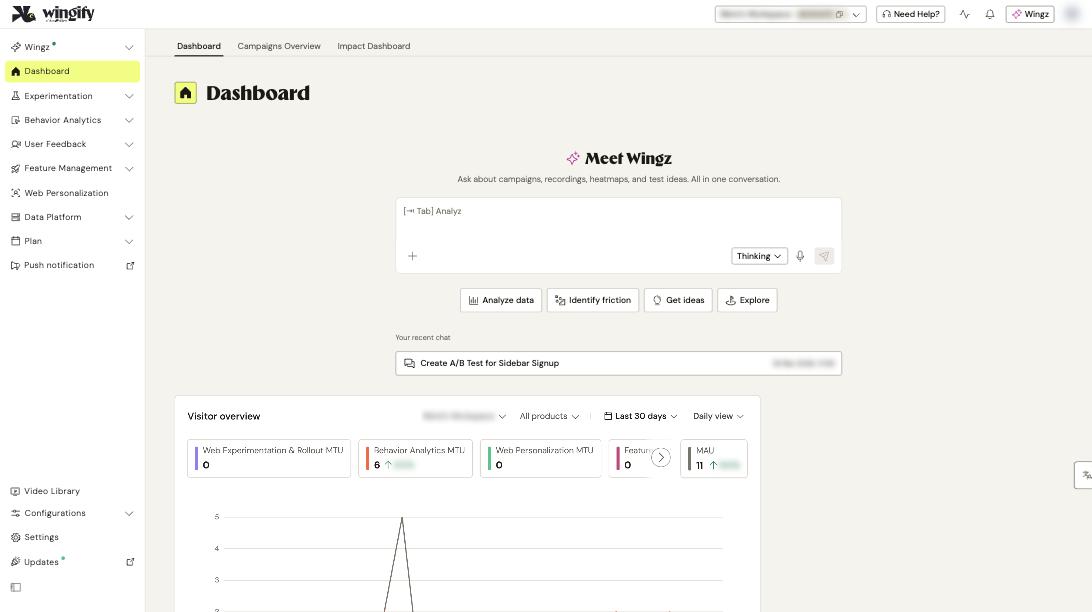
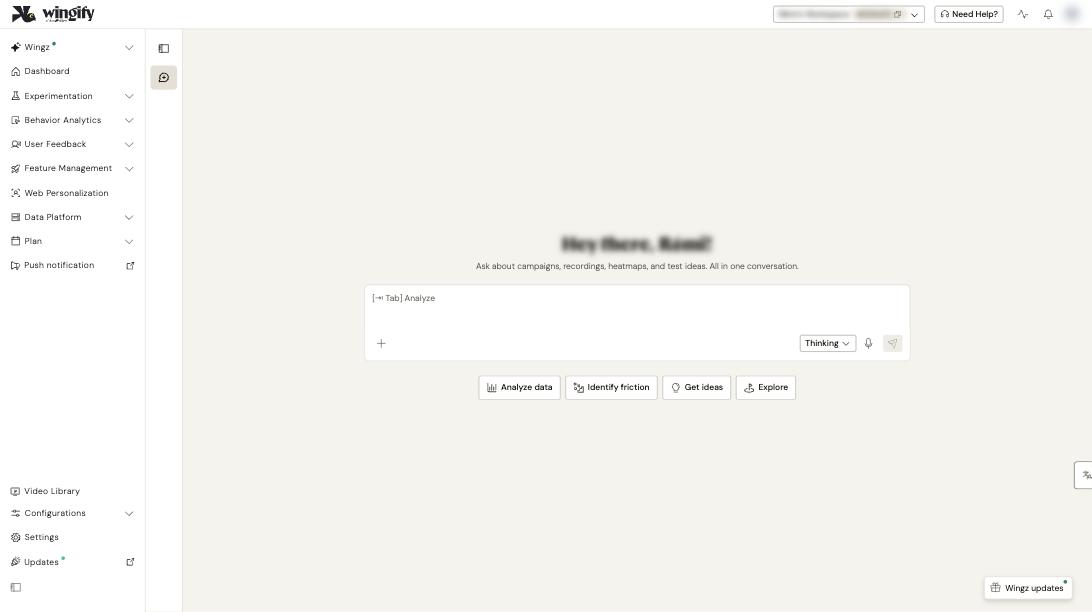
Go to Wingz > Chat, or use the Wingz box on the Dashboard. You can also click Wingz in the header from any page.
#2. Ask a question about a campaign
Type your question in the input box. Type # to pick a campaign from the autocomplete list, so Wingz analyzes exactly that campaign. Click Send message, or use the microphone icon to dictate. Useful prompts:
- Give me a summary of #[campaign]: variations, traffic split, hypothesis, metrics and report links.
- In this campaign, compare desktop vs. mobile performance.
- Show me all tests run on checkout flow.
- Suggest ideas to improve my cart abandonment rate.
Use the shortcuts Analyze data, Identify friction, Get ideas and Explore for common starting points.
Tip: Start broad, then narrow: "Compare desktop vs. mobile", then "Now break this down by new vs. returning visitors". Finish with "Based on these results, what should I test next?"
#3. Add files for context (optional)
Click Add files, agents and more (the + button) to attach screenshots (for example, competitor designs or mockups) or PDFs such as PRDs and research briefs. Example: Does the performance of campaign #Z2075 align with the objectives in the attached PRD?
#4. Audit a draft before launch
Go to Experimentation > Web Experimentation, filter on Draft, and click Review with Wingz on your campaign. Wingz audits metrics, audience, traffic split and goals and tells you whether the campaign is ready. You can then ask follow-up questions.
#5. Summarize reports
- One campaign: hover over a running or paused campaign in the list and click Ask Wingz, or click Summarize at the top of its Report tab. The summary includes date range, variations, unique visitors, expected conversion rates and improvement.
- Several campaigns: filter the list by status (for example, Running) and click Summarize at the top of the list.
- Behavior data: on Session Recordings, click Summarize recordings; Wingz also analyzes heatmaps and survey responses.
#6. Create a campaign with AI
Go to Experimentation > Web Experimentation, click Create > Create with Wingz (or Create with Wingz on Web Rollout). Enter the page URL and a prompt describing the changes, metrics and audience. Click the wand icon for three refined prompts and Apply Prompt, or pick one of the three suggested ideas. Click One-Click Setup via Wingz, review the configuration, then Continue with Wingz. The editor opens with your variation: review it, click Accept all & Save, then start the test from the summary page.
Note: Wingz applies changes to one page per prompt, and can't modify elements that appear only after user interaction. For Web Rollout, add metrics yourself after creation.
#Check that it worked
- Wingz's answers include links to the relevant reports; open one to cross-check numbers.
- Your chat history is kept, so you can scroll back and continue a conversation.
- Credit usage: click the Account usage activity icon in the header. The account owner is emailed at 80% and 100% of the allowance.
#Common questions
Can Wingz Chat answer in another language? Yes. It supports 30+ languages and replies in your account language by default. You can also ask it to reply in any language.
Do I need GA4? No. Without GA4, Wingz works with your Wingify data; with GA4 connected you can also query GA4 metrics, for example "top 5 most-visited pages" as a pie chart.
Wingz targeted the wrong element. What should I do? Be more specific (for example, "the 'Subscribe' button"), and adjust the variation in the Wingify Editor; everything Wingz creates is editable.
Why can't I see the cost before a request runs? Cost depends on the complexity of the input and output, so Wingz doesn't show an estimate beforehand. All workspaces share one account-wide credit pool.