
Send experiment data to your analytics or session-replay tool
Push campaign and variation data to Hotjar, Contentsquare, Microsoft Clarity, FullStory, Mouseflow, Glassbox or Adobe Analytics, or to any other tool with the onVariationApplied callback, then filter recordings and reports by variation.
The Wingify Guide can move a cursor on your screen inside the app and walk you through this, click by click (8 steps).
#When to use this
Your test report says Variation 2 wins, and you want to understand why by watching recordings and heatmaps of the people who saw it in the tool your team already uses. Or your analysts want Wingify variations as a dimension in Adobe Analytics. Wingify tags each visitor who becomes part of a campaign with the campaign and variation, so you can filter your other tool by variation. For tools without a built-in integration, a small callback sends the same data anywhere.
#Before you start
- The Wingify SmartCode and the other tool's tracking code are installed on the same pages.
- You have Admin access in Wingify to create connections. Publish users can turn integrations on or off in a campaign.
- Note your campaign ID (the ID column in Web Experimentation). Variation IDs start at 1 for Control, then 2 for the first variation, and so on.
- Accounts created before June 14, 2026 send
VWOnames and tags, and newer accounts sendwingifynames and tags.
#Steps
#1. Create the connection
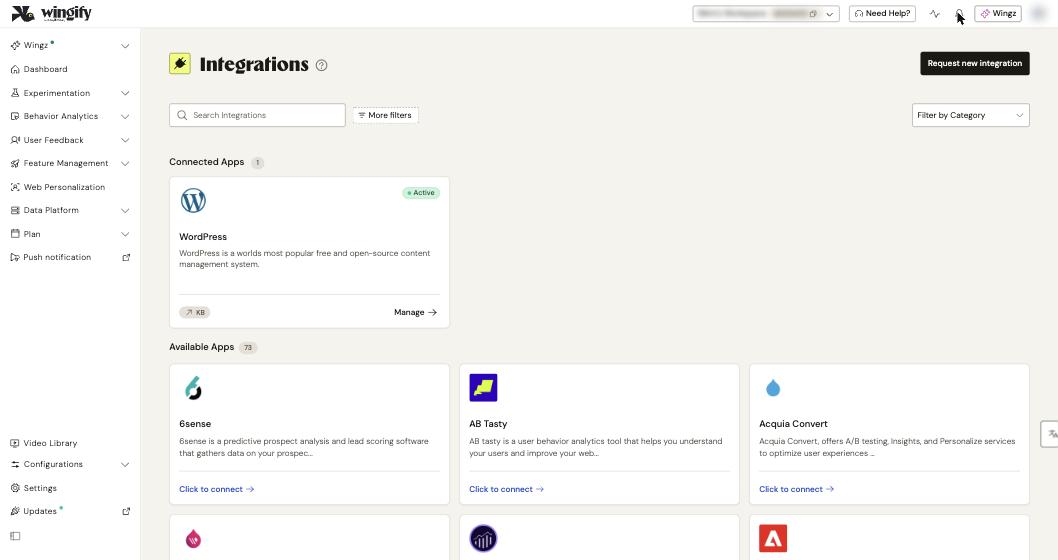
Go to Configurations > Integrations and type the tool's name in Search Integrations. Open its card, click Create Connection, choose the connection type and enter a Connection Name:
| Tool | Connection type | Extra fields |
|---|---|---|
| Hotjar (Contentsquare) | Send campaign data to Hotjar | none |
| Contentsquare | Send campaign data to Contentsquare | none |
| Microsoft Clarity | Send campaign data to Microsoft Clarity | none |
| FullStory | Send Campaign Data to FullStory | none. Import Segments from FullStory needs an API Key |
| Mouseflow | Send campaign data to Mouseflow | none |
| Glassbox | Send campaign data to Glassbox | none |
| Adobe Analytics | Send campaign data to Adobe Analytics | Report Suite ID and eVar (1 to 250) |
Click Create Connection. The connection is listed on the Config tab under Active Connections.
Tip: Switch on Default for a connection to apply it to all new campaigns. Existing campaigns aren't affected.
Note: For Adobe Analytics, a connection can't be edited after you create it. To use another eVar or report suite, create another connection. You can have one connection per eVar.
#2. Turn it on in each campaign
Creating the connection doesn't turn it on for existing campaigns. Open the campaign in Experimentation > Web Experimentation, go to the Integrations step, select the tool (and connection, if you have several) and click Save Now. Mouseflow can also be turned on in Web Personalization campaigns.
#3. Filter the other tool by variation
| Tool | What Wingify sends (newer accounts) | Where to filter |
|---|---|---|
| Hotjar | Event wingify-<campaign ID>-<variation ID> (for example wingify-36-1) |
Recordings or Heatmaps > Add Filter > Event |
| Contentsquare | Dynamic variable AB_..._<campaign ID>:<campaign name> = variation name |
All Visitors > Dynamic Variables. You can COMPARE variations |
| Microsoft Clarity | Custom tag wingify = wingify-<campaign ID>-<variation ID> |
Filters > Custom filters > Custom tags (allow about 1 hour) |
| FullStory | Event wingify with campaign and variation IDs and names |
Event Filters > Custom Event |
| Mouseflow | Tag wingify-<campaign ID>-<variation ID> |
Filters > Tags and variables > Tag > Has any of the following |
| Glassbox | Event wingify with campaign and variation IDs and names |
Recorded Sessions > filter A/B Testing Experiment or A/B Testing Variant |
| Adobe Analytics | eVar<N> = wingify-<campaign ID>-<variation ID>-... |
Reports broken down by your eVar |
Contentsquare can also be connected from the Contentsquare side: Console > INTEGRATIONS > + Add integration > Wingify. Doing it on one side is enough. Activation there can take about 24 hours on business days.
#4. Send data to any other tool (custom client-side integration)
This works on all plans. A developer adds the onVariationApplied callback once for the whole site: go to Configurations > Websites and Apps, open your website and use Sitewide JS. Wingify runs the callback each time a campaign is applied, with the visitor ID, campaign ID, name and type, and variation ID and name:
window.Wingify = window.Wingify || [];
window.Wingify.push(['onVariationApplied', function (data) {
  if (!data || !data.campId) return;
  fetch('https://your-server.example.com/wingify-events', {
    method: 'POST',
    headers: { 'Content-Type': 'application/json' },
    body: JSON.stringify({ visitorId: data.visId, campaignId: data.campId,
      campaignName: data.campName, variationId: data.varId, variationName: data.varName })
  });
}]);
Accounts created before June 14, 2026 use window.VWO instead of window.Wingify. targetId and targetName are filled only for Web Personalization campaigns. For the full field list, see Variation Applied.
#Check that it worked
- Open your site in an incognito window, join a running campaign, and check the other tool. For Mouseflow, open the recording and look under Tags and variables.
- For the callback, open the browser's Network tab and check that the request is sent to your endpoint.
- Only new sessions are tagged. The integrations don't work retroactively.
#Common questions
Nothing shows up in Hotjar or Mouseflow. What should I check? Check that both scripts run on the test page and that the integration is selected in the campaign's Integrations step. Turning it on for the account isn't enough. Also check the tag format, and clear your cache or use a fresh incognito window.
Can I see variation names instead of IDs in Mouseflow? No. Mouseflow tags contain the variation ID. Keep a mapping sheet, for example wingify-39-1 = Control.
Does the integration slow down my site? No. It pushes a small string or event to the tool's existing script and doesn't load extra scripts.
My callback sends duplicate events. Register it in only one place, not in both Sitewide JS and a campaign's custom JS. If consent gating is on, the callback fires only after the visitor gives consent.
#Learn more
- Integrate Wingify with Hotjar (Contentsquare)
- Integrate Wingify with Contentsquare
- Integrate Wingify with Microsoft Clarity
- Integrate Wingify with FullStory
- Integrate Wingify with Mouseflow
- Integrate Wingify With Glassbox
- Integrate Wingify with Adobe Analytics
- Send Wingify Experiment Data to Your Own Server or Tool
Help-center sources (8)
- Integrate Wingify with Hotjar ContentSquare
- Integrate Wingify with Contentsquare
- Integrate Wingify with Microsoft Clarity
- Integrate Wingify with FullStory
- Integrate Wingify with Mouseflow
- Integrate Wingify With Glassbox
- Integrate Wingify with Adobe Analytics
- Send Wingify Experiment Data to Your Own Server or Tool Custom Client Side Integration