
Choose the right test type (A/B single page, multi-page, Split URL, Multivariate)
Pick the Web Experimentation campaign type that fits your hypothesis, your pages and your traffic.
The Wingify Guide can move a cursor on your screen inside the app and walk you through this, click by click (7 steps).
#When to use this
You have a hypothesis ("a sticky add-to-cart button will lift orders", "the new checkout design converts better") and need to decide how to test it. Wingify Web Experimentation offers four campaign types, and the right one depends on how big the change is, whether it lives on one page or several, whether it is hosted on a different URL, and how much traffic you have.
#Before you start
- Write down the change you want to test and the page(s) it affects.
- Know roughly how much traffic those pages get: some test types need much more than others.
- The Wingify SmartCode must be installed on all pages involved (including variation URLs for Split URL tests).
#Steps
#1. Open the Create menu
Go to Experimentation > Web Experimentation and click Create. The menu lists Create with Wingz, AB - Single Page, AB - Multi Page, Split URL and Multivariate test.
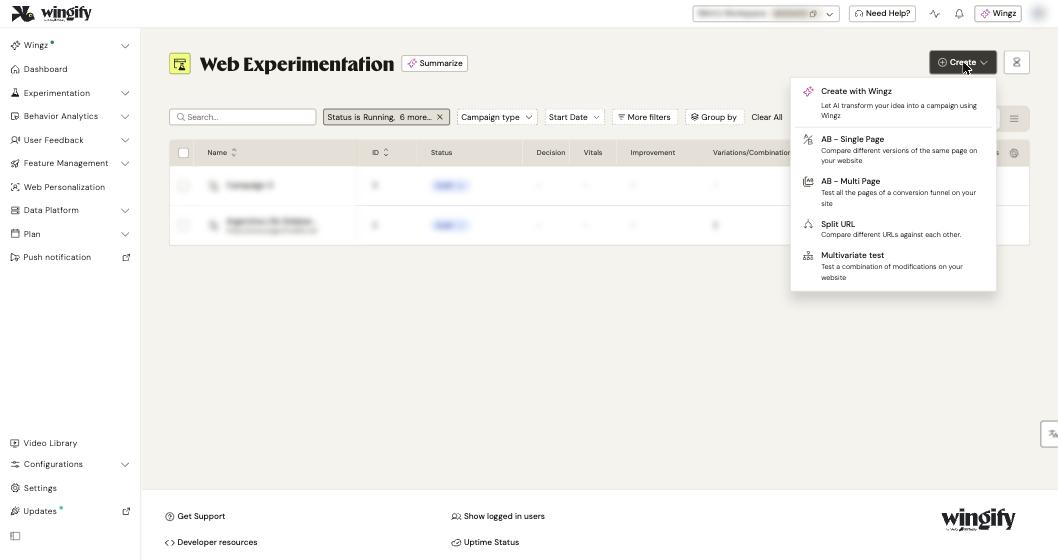
#2. Compare the four types
| Type | Use it when | How it works |
|---|---|---|
| AB - Single Page | You want to compare two or more versions of the same page (same URL), usually with smaller changes such as a headline or button. | Variations are served on the same URL; Wingify injects your changes. |
| AB - Multi Page | Your change spans several pages, for example every step of a checkout funnel. | You define page groups; the same visitor sees consistent changes across all of them. |
| Split URL | You want to compare pages hosted on different URLs, or test a major redesign or a different flow. | Visitors who land on the control URL are redirected (by JavaScript) to the variation URL. |
| Multivariate test | You want to find the best combination of changes to several elements on one page. | Wingify generates every combination of your element changes and tests them all. |
#3. Match the type to the size of the change
- Choose AB - Single Page for minor changes on one page. Small changes are applied efficiently without a redirect.
- Choose Split URL when the variation is on a different URL or differs significantly from the control. Don't use it for small tweaks like a button color: it adds a redirect that an A/B test avoids.
- Choose AB - Multi Page when the same idea must be applied consistently across several page types. Each page group gets its own editor URL, so you can edit each page independently.
#4. Check your traffic before choosing Multivariate
The number of combinations in a multivariate test is multiplicative: two elements with two versions each already give four combinations, and each needs enough visitors and conversions. Wingify recommends multivariate testing only for high-traffic pages and when you have time to let the test run. If a multivariate test would take too long, break it into several A/B tests.
Tip: Use Duration Estimator on the Web Experimentation page to estimate how long a test needs to run.
#5. Avoid overlapping tests
If you plan several tests on the same page, don't change the same element in more than one test, and never run multiple Split URL tests on the same control URL: visitors would be redirected to different variation URLs at once and reports would be skewed. When tests share a page or audience, put them in a mutually exclusive group (More configurations > Mutually Exclusive).
#6. Create the campaign
Select the type in the Create menu. Then follow the matching guide:
- Run your first A/B test
- Compare two different URLs with a Split URL test
- Test combinations of changes with a multivariate test
#Check that it worked
The campaign opens on the Configuration tab with the steps for its type. For a Split URL test there is no separate page-URL setup: you define the control and variation URLs in the variations step. For AB - Multi Page, the Pages step asks you to add page groups instead of a single URL.
#Common questions
Can a Split URL test be followed by an A/B test? Yes. Once a Split URL test declares a winning design, you can refine it further with A/B tests on smaller changes.
What if I'm unsure which type fits? Pick Create with Wingz in the Create menu to let Wingz transform your idea into a campaign suggestion.
Can I run several A/B tests on one page? Yes, as long as they change different elements, but visitors may be part of all of them and results may not be statistically clean. A multivariate test or a mutually exclusive group can be better choices.
Does Manual Activation work for every type? No. Manual activation is not allowed for Split URL tests.